
Why Favicons Are Not To Be Missed Out
That is the question.
Chances are you clicked this link because you don’t know what a favicon is or what it looks like – right? Well, in this blog we can help explain all of this and ease any concerns you have!
So, let’s get started!
What Is A Favicon?
First up on our list is the basic question “what is a favicon?”.
Well, it’s something you see every day when you use the internet whether that be on your desktop, mobile or tablet – this makes for a good round of ‘I Spy’.
Any guesses what it is?
No?
Okay, fine, we give in!
Favicons are the tiny (16×16 px) pixel logo icons you see across all your open tabs at the top of your browser window. They can also be seen in your browser history, your bookmarks tab and when you use your browser’s search bar.
As favicons are so tiny it’s better to use a logo as it’s easily recognisable.
Their purpose is to help you spot the correct tab (amongst many open tabs) all by the recognition of the brand’s logo icon.
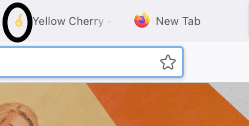 Did you know that the word favicon is an amalgamation of the words “favourite icon“?
Why Does A Favicon Matter?
Think of favicons like signs. You can see them all lined up with their logo icons on show.
They’re very useful for users to identify a brand from others when they have multiple tabs open. They also help remind users of your brand which in turn creates brand awareness.
Top Tips From Our Graphic Designers
- Try and avoid your favicon blending in with the web browser tab colour. Now, it’s not always possible to avoid this but our designers look at making favicons work with the most common web browser tab colours; black and white.
- If you have a complicated design, then simplifying this is the best way to go. You don’t want to cram in lots of text as it’ll be illegible. Letters or icons work best.
- A good favicon is one that is clear and easily distinguishable from the bookmarks bar and/or other web browser tabs but that relates to your brand.
How Many Do I Need To Have?
The answer to this is one. There’s no need to have multiple favicons as you run the risk of confusing the user.
What Are The Benefits Of Favicons?
There are many benefits of having a favicon as part of your website. These are namely:
- They reinforce credibility and trust
- It sets you apart from your competitors
- They help users find a tab easily – people retain visual information better than words
- If users bookmark your website, they can identify it from the list easier when they return to find you.
But I Use A Mobile?
With the increased use to search the web by mobile phones, we appreciate that the interface is vastly different from a desktop interface. However, the same idea still applies it’s just that in the case of mobile, favicons are the icons associated with apps. These are better known as touch icons.
How Do I Create A Favicon?
There are a few different software tools you can use to do this:
- Photoshop
- Illustrator
- WordPress – favicons made for WordPress websites are made at 512×512 px. WordPress automatically scales this down to 42×42 px.
If you decide to go down the route of creating a favicon yourself, you’ll want to make sure that the image format you use is either JPEG, PNG, GIF or ICO.
All you really need is a programme that allows you to resize, rescale and edit an image (preferably a vector file) to be 512×512 px and export it as a transparent PNG.
At Yellow Cherry, we can take care of this technical stuff for you. So, if this is proving too difficult for you why not contact us as our talented Graphic Designers can help create a favicon that’s on brand with your business?
Wrapping Up
You may now appreciate how useful favicons are especially to your users or even for yourself when you’re browsing the internet.
If you’re thinking about re-branding or looking to have a logo that you are proud of, then get in touch today to see how we can help bring your ideas to life.